'%3e%3cpath%20d='M150.127%20195.325C233.04%20195.325%20300.255%20168.696%20300.255%20135.848C300.255%20103%20233.04%2076.3709%20150.127%2076.3709C67.2143%2076.3709%200%20103%200%20135.848C0%20168.696%2067.2143%20195.325%20150.127%20195.325Z'%20fill='white'/%3e%3cpath%20d='M231.093%20118.256L150.117%20-0.000183105L69.1527%20118.256C68.1365%20119.748%2067.5967%20121.294%2067.5967%20122.871C67.5967%20136.017%20104.538%20146.666%20150.117%20146.666C195.697%20146.666%20232.638%20136.007%20232.638%20122.871C232.638%20121.294%20232.098%20119.748%20231.082%20118.256H231.093Z'%20fill='%2301A9F2'/%3e%3cpath%20d='M150.106%20356.844L98.7265%20281.5L62.3035%20311.117L25.4253%20257.017L50.787%20239.721L68.8556%20266.226L105.279%20236.62L150.106%20302.363L194.934%20236.62L231.357%20266.226L270.045%20209.48L295.407%20226.776L237.898%20311.117L201.475%20281.5L150.106%20356.844Z'%20fill='white'/%3e%3cpath%20d='M592.168%20165.22V237.908H561.482V171.825C561.482%20153.884%20551.807%20143.034%20535.051%20143.034C516.644%20143.034%20505.318%20156.011%20505.318%20175.604V237.908H474.875V171.349C474.875%20153.407%20464.968%20142.791%20448.445%20142.791C429.804%20142.791%20418.711%20156.011%20418.711%20176.07V237.908H388.025V118.964H418.711V134.301C426.502%20122.033%20440.421%20115.418%20458.13%20115.418C477.014%20115.418%20490.7%20122.975%20498.247%20135.953C506.747%20123.208%20521.608%20115.418%20540.725%20115.418C572.819%20115.418%20592.179%20135.476%20592.179%20165.22H592.168Z'%20fill='white'/%3e%3cpath%20d='M899.48%2080.2534C899.48%2068.2182%20909.388%2059.4856%20920.248%2059.4856C931.574%2059.4856%20941.248%2068.9274%20941.248%2080.2534C941.248%2091.3465%20931.574%20100.788%20920.248%20100.788C909.155%20100.788%20899.48%2092.0557%20899.48%2080.2534Z'%20fill='white'/%3e%3cpath%20d='M935.832%20118.955H905.146V237.899H935.832V118.955Z'%20fill='white'/%3e%3cpath%20d='M1140.2%20118.955H1173L1099.84%20288.644H1067.5L1090.6%20237.666L1043.42%20118.955H1076.45L1107.37%20204.81L1140.18%20118.955H1140.2Z'%20fill='white'/%3e%3cpath%20d='M883.182%20115.418H815.904C781.45%20115.418%20755.008%20137.837%20755.008%20171.825C755.008%20206.756%20778.846%20228.466%20815.904%20228.466C831.951%20228.699%20847.288%20231.059%20847.288%20246.64C847.288%20259.617%20835.962%20267.175%20817.555%20267.175C799.148%20267.175%20784.985%20254.664%20781.915%20239.326L756.66%20246.873C763.741%20274.722%20787.346%20292.188%20817.312%20292.188C856.963%20292.188%20876.313%20272.838%20876.313%20249.233C876.313%20234.605%20869.231%20223.036%20855.545%20215.721C868.522%20206.047%20877.022%20190.709%20877.022%20171.825C877.022%20160.986%20871.412%20149.3%20863.145%20140.674H883.182V115.418ZM815.904%20203.919C797.264%20203.919%20782.392%20192.117%20782.392%20171.825C782.392%20151.534%20799.148%20139.964%20815.904%20139.964C832.66%20139.964%20849.416%20151.29%20849.416%20171.825C849.416%20188.814%20835.497%20203.919%20815.904%20203.919Z'%20fill='white'/%3e%3cpath%20d='M737.426%20237.906V118.962H708.158V136.088C698.685%20121.481%20682.796%20115.426%20668.983%20115.426C633.587%20115.426%20608.087%20143.509%20608.087%20179.148C608.087%20214.788%20633.1%20241.452%20668.03%20241.452C682.426%20241.452%20698.24%20235.08%20708.148%20220.917V237.906H737.415H737.426ZM673.471%20213.835C653.645%20213.835%20638.308%20199.207%20638.308%20178.429C638.308%20157.65%20653.889%20143.032%20673.704%20143.032C694.705%20143.032%20709.1%20160.021%20709.1%20178.429C709.1%20196.836%20694.472%20213.835%20673.46%20213.835H673.471Z'%20fill='white'/%3e%3cpath%20d='M1003.29%20111.085C1003.29%2098.5315%201011.17%2091.8842%201023.98%2091.8842C1028.9%2091.8842%201033.83%2092.6251%201037.77%2093.853L1042.2%2068.0043C1038.02%2066.7765%201027.43%2064.7971%201021.27%2064.7971C994.18%2064.7971%20972.607%2081.786%20972.607%20110.355V118.961H956.889V144.216H972.607V164.519V237.915H1003.29V144.216H1038.46V118.961H1003.29V111.096V111.085Z'%20fill='white'/%3e%3c/g%3e%3cdefs%3e%3cclipPath%20id='clip0_1_3'%3e%3crect%20width='1173'%20height='356.842'%20fill='white'/%3e%3c/clipPath%3e%3c/defs%3e%3c/svg%3e)

Segmentation
Overview
Segmentation is a mechanism for dividing application users into groups (segments) based on specific characteristics.
Segments are used to control user behavior and deliver relevant configurations within Remote Config entities, including:
- campaigns (parent and nested);
- features;
- impression limits;
- A/B tests.
Segmentation allows you to:
- deliver different configurations to different audiences;
- control campaign and feature reach;
- run A/B tests;
- configure and validate setups for specific user groups (for example, QA).
Where to Find Segmentation
The Segmentation section is available at:
Magify > Configurations > Remote Config > Segmentation
This section displays the list of all segments created for the selected application.
Default Segment (ALL)
When a new application is added to the system, a system segment named ALL is created automatically.
The ALL segment is created for:
- the application in production;
- the application in sandbox.
The ALL segment includes all users of the application.
You can view an example of the ALL segment for a Demo application by following this link.
ALL Segment Details
- created automatically when an application is added;
- includes 100% of application users;
- does not contain any segmentation criteria;
- available in all Remote Config entities;
- can be archived;
- can be edited, however it is recommended to keep the ALL segment unchanged and create separate segments for custom scenarios.
Creating a Segment
To create a new segment, navigate to:
Magify > Configurations > Remote Config > Segmentation > Create New

When creating a segment, you need to:
- Select the application for which the segment is created;
- Specify a segment name;
- Configure segmentation criteria.
After saving, the segment becomes available for further use.
How Segmentation Works
Segmentation in Magify is dynamic.
This means:
- user–segment matching is recalculated on every configuration request;
- a user can automatically:
- enter a segment;
- stop matching a segment;
- match the segment again.
Segments do not store users and do not form permanent audiences.
Segment Lifecycle
- a segment becomes active immediately after saving;
- no additional activation or publishing is required;
- segment changes are applied automatically;
- a segment can be edited or archived at any time;
- archived segments cannot be restored;
- if needed, an archived segment can be cloned by assigning it a unique name and using it as a new segment.
If a segment is used in active entities, changes are applied on the next user configuration requests.
Next, the documentation covers available segmentation criteria, their logic, and usage examples.
Name
The Name field defines the segment name.

Rules
- the segment name must be unique within the application;
- the name can be specified in any language;
- using English is recommended for consistency and easier navigation.
Language Usage
Campaign and A/B test names are part of attribution data and are stored in ClickHouse, where using Latin characters ensures proper indexing, filtering, and aggregation.
Segment names belong to configuration metadata and are not involved in high-load event processing.
Because of this, segment names can safely use any language, including non-Latin scripts.
Segment Naming Recommendations
It is recommended to include key segmentation parameters in the segment name.
A segment name should be short, descriptive, and easy to scan.
Only parameters that are actually used in the segment should be reflected in the name.
Unused criteria should not be included.
Segment names can be changed after saving.
Application
The Application field defines the application for which the segment is created.

Select the required application from the dropdown list.
The segment will be available only within the selected application and cannot be used for other applications.
You can view an example of using Auditory in a segment for the Demo application by following this link.
Auditory
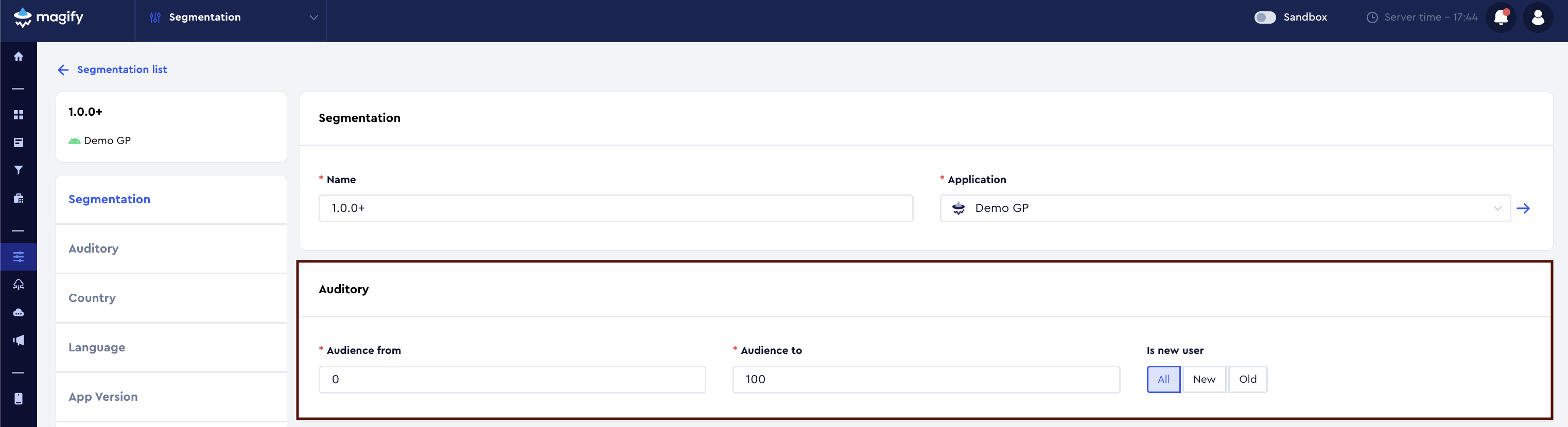
The Auditory block defines which portion of the application audience and which user type is included in the segment.
It consists of two parts:
- percentage-based audience split;
- filtering by new / existing user status.
Default Behavior
If the Audience from / Audience to and Is new user fields are not modified, the segment includes 100% of the application audience by default.
Audience from / Audience to
Defines the percentage of users included in the segment.
The audience is specified as a range using:
- Audience from
- Audience to
How It Works
- range
0–100— 100% of users; - range
0–50— the first 50% of users; - range
51–100— the second 50% of users, non-overlapping with the first half.
This allows you to deterministically split the audience into non-overlapping groups.
Is new user
The Is new user field allows you to further segment the audience by new vs existing users.
This flag is sent by the client.
Available Values
- All — all users, regardless of status;
- New — new users;
- Old — existing users.
Logic
As a general rule:
- New user — a user who has never updated the application. Their Initial App Version is equal to the current app version.
- Old user — a user who has updated the application at least once.
Important notes:
- when a new app version is released, a user who was previously considered New becomes Old after updating;
- a user is considered New only if their first installed version matches the current app version.
The New / Old status is dynamic and changes with each application update.
Auditory is commonly used for:
- A/B testing;
- gradual feature rollouts;
- validating configurations on a subset of users.
You can view an example of an Auditory-based segment for the Demo application by following this link.
Country
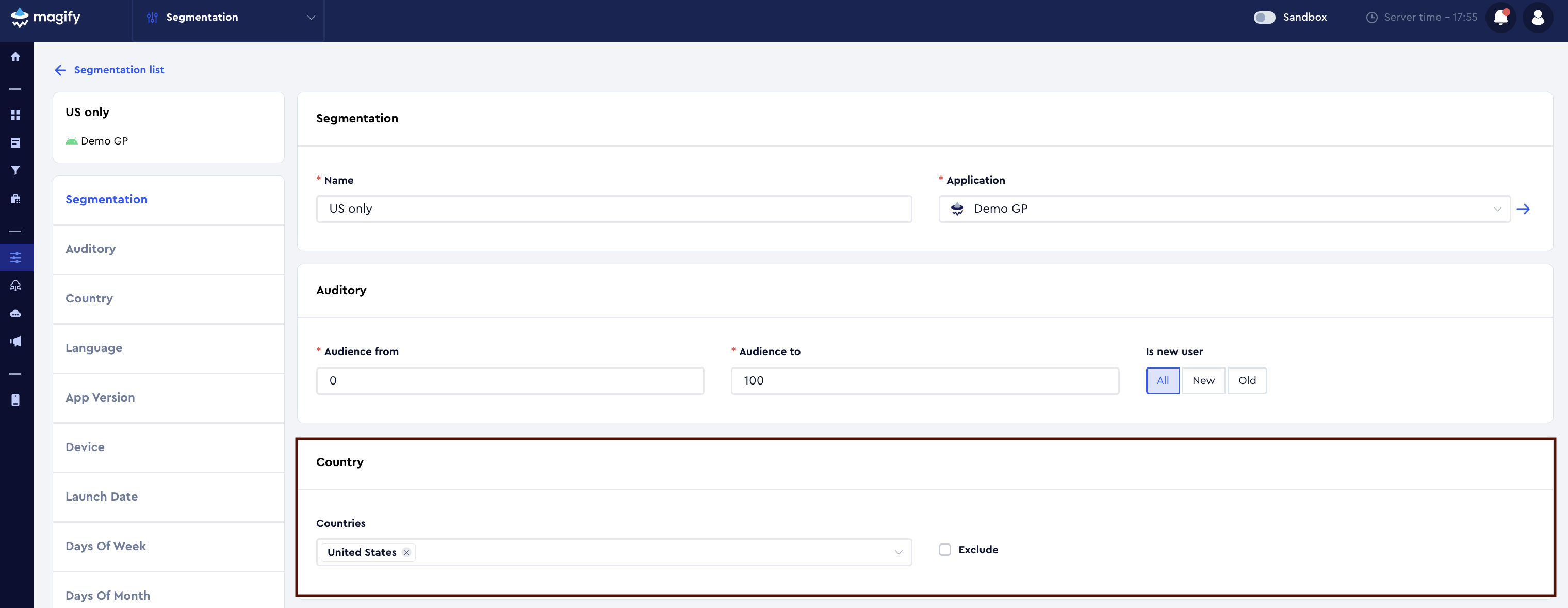
The Country criterion allows you to segment users based on their country of location.
The country is determined based on the user’s IP address.
Countries
In the Countries field, select one or multiple countries from the dropdown list.
- if one country is selected, the segment applies only to users from that country;
- if multiple countries are selected, the segment applies to users from any of the selected countries.
Selected countries within the Countries field are combined using OR logic.
Exclude
The Exclude checkbox changes the criterion logic:
- Exclude disabled — the segment applies only to users from the selected countries;
- Exclude enabled — the segment applies to all users except those from the selected countries.
Notes
- the country is determined dynamically on each configuration request;
- if a user’s IP-based location changes, they may enter or leave the segment;
- Country is commonly used together with Language, App Version, and Auditory criteria.
You can view an example of a Country-based segment for the Demo application by following this link.
Language
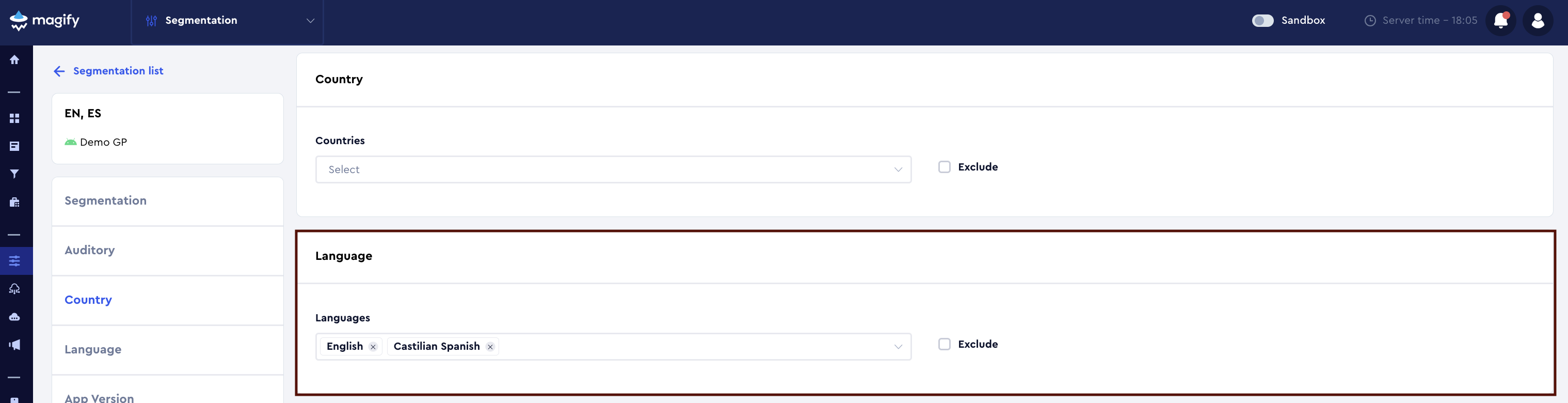
The Language criterion allows you to segment users based on their device language.
The language is determined from the system language settings of the user’s device.
Languages
In the Languages field, select one or multiple languages from the dropdown list.
- if one language is selected, the segment applies only to users with that device language;
- if multiple languages are selected, the segment applies to users with any of the selected languages.
Selected languages within the Languages field are combined using OR logic.
Exclude
The Exclude checkbox changes the criterion logic:
- Exclude disabled — the segment applies only to users with the selected device languages;
- Exclude enabled — the segment applies to all users except those with the selected device languages.
Notes
- the language is taken from the device system settings, not from the in-app language selector;
- changing the device language may cause a user to enter or leave the segment;
- Language is commonly used together with Country and Auditory criteria.
You can view an example of a Language-based segment for the Demo application by following this link.
App Version
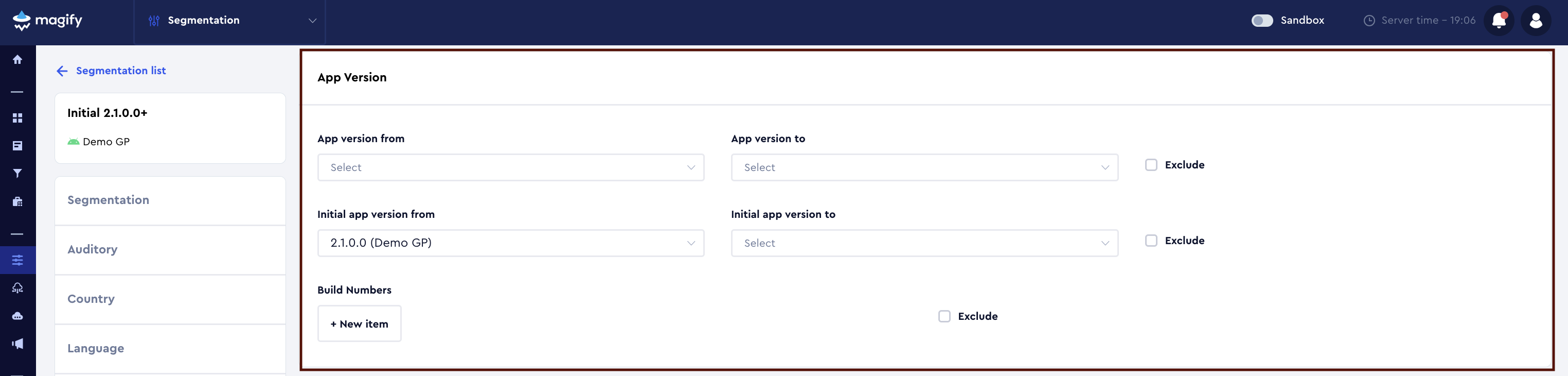
The App Version block allows you to segment users by application version.
It includes:
- current app version;
- initial app version;
- build numbers.
App version
The App version field defines the current application version used by the user.
You can specify the version using:
- a range —
from/to; - a lower bound —
fromonly; - an upper bound —
toonly.
How It Works
- App version from — minimum version (inclusive);
- App version to — maximum version (inclusive);
- if only one field is set, the other is treated as unbounded.
Initial app version
The Initial app version field defines the version with which the user first installed the application.
Example: a user is currently on 2.3.0, but initially installed the app on 1.8.0.
In this case, Initial app version = 1.8.0.
This field supports:
- ranges (
from/to); - lower or upper bounds.
Exclude
The Exclude checkbox is available for both App version and Initial app version.
- Exclude disabled — the segment applies to the specified versions;
- Exclude enabled — the segment applies to all versions except the specified ones.
Build Numbers
The Build Numbers field allows segmentation by specific application build numbers.
- build numbers are added manually using + New item;
- Exclude mode is supported.
Build Numbers are primarily intended for:
- QA (testing specific builds);
- configurators (delivering configs to test builds);
- targeted hotfixes and temporary technical restrictions.
This is a utility feature and is typically not used for broad product segmentation.
Exclude (Build Numbers)
The Exclude checkbox changes the logic of the Build Numbers field:
- Exclude disabled — the segment applies only to users with the specified build numbers;
- Exclude enabled — the segment applies to all users except those with the specified build numbers.
Adding values
Each version value is added as a separate item, not as a comma-separated list.
You can add a version in two ways:
- Click + New item;
- Enter the required version in the input field and press Enter.
After that:
- you can immediately enter the next version;
- the input field remains active until you click outside of it (for example, the Save button or any other area of the interface).
You can view an example of an App Version–based segment for the Demo application by following this link.
Device
The Device block allows you to segment users based on device characteristics.
It includes:
- Device groups — predefined device groups;
- Device type — device form factor;
- OS versions — operating system versions.
All parameters inside the Device block are combined using AND logic.
Device groups
The Device groups field allows segmentation using predefined device groups.
These groups are defined on the platform side and represent aggregated technical device categories. Multiple groups can be selected — selected groups are combined using OR logic.
Android device groups
- all-phones-android — all Android devices classified by the system as phones, including edge-case and non-standard models. Recommended for QA and technical rollouts.
- Android Phone — a logical group of Android devices with Phone type. Recommended for product segmentation.
- android-tablet — android tablets. Used for tablet-specific scenarios.
- xhdpi / xxhdpi / xxxhdpi — groups based on screen density (DPI). Primarily used for QA and UI validation.
iOS device groups
- iPhone — all iPhone devices.
- iPhone6–8 — iPhone 6 / 6s / 7 / 8
- iPhone6–8 plus — Plus models 6–8
- iPhone7Seg — iPhone 7 generation and similar devices
- iPhoneX plus — X-series devices with larger form factors
- plus_phones — All iPhones with a Plus-sized screen. Useful when screen size matters more than the exact device generation.
- iPad — all iPad devices
Exclude (Device groups)
- Exclude disabled — applies only to selected groups;
- Exclude enabled — applies to all devices except the selected groups.
Device type
Allows segmentation by device form factor:
- Phone
- Tablet
Exclude (Device type)
- Exclude disabled — applies to selected device types;
- Exclude enabled — applies to all device types except the selected ones.
OS versions
Allows segmentation by device operating system version.
One or multiple OS versions can be selected. Selected values are combined using OR logic.
Exclude (OS versions)
- Exclude disabled — applies to selected OS versions;
- Exclude enabled — applies to all OS versions except the selected ones.
Notes
- device and OS information is provided by the client;
- changing device or OS version may affect segment matching;
- the Device block is commonly used together with App Version and Auditory.
You can view an example of a Device-based segment for the Demo application by following this link.
Launch Date
The Launch Date criterion allows you to segment users based on the date of the first application launch.
The first launch is defined as the first actual app start after installation.
Launch date from / Launch date to
The Launch date from and Launch date to fields define a calendar date and time range for the first app launch.
- only from — users who launched the app starting from the specified date;
- only to — users who launched the app before the specified date;
- from + to — users whose first launch falls within the specified range (inclusive).
Exclude (Launch date)
- Exclude disabled — applies to users whose first launch is within the range;
- Exclude enabled — applies to users whose first launch is outside the specified range.
Day after launch from / Day after launch to
The Day after launch fields allow segmentation based on the number of days since the first app launch.
- counting starts from the first launch date;
- days are counted as calendar days, not by actual time spent in the app;
- 0 — installation and first launch day;
- 1 — the next calendar day;
- 2 — the second day after launch, and so on.
Exclude (Day after launch)
- Exclude disabled — applies to users within the specified day range;
- Exclude enabled — applies to all users except those within the range.
Platform specifics
Android
On Android, device time changes may affect Day after launch segmentation.
In practice, this is rare and usually not a concern.
iOS
On iOS, changing the device time does not affect Day after launch.
Users will match the segment only after the actual number of days has passed.
Recommendations
- use Launch date when a specific install date matters;
- use Day after launch when the user’s age in the app matters;
- combine Day after launch with other criteria to target fresh users accurately.
You can view an example of a Launch Date–based segment for the Demo application by following this link.
Days of Week
The Days of Week criterion defines on which days of the week a segment is active.
The segment is applied to users only on the selected days.

How Days of Week works
- you can select all days or only specific days;
- selected days are combined using OR logic;
- the segment is active when the user’s current day of the week matches one of the selected days.
How the day of the week is calculated
The day of the week is calculated on the server side.
- the server uses its own time as a baseline;
- if the client provides the user’s timezone, the server applies the client timezone and determines the user’s local day of the week;
- if the timezone is not provided by the client (SDK versions below 4.5.4), UTC is used.
As a result:
- if a user opens the app at 00:00 in their local timezone on Saturday, a segment configured for Saturday will be applied;
- changing the device time does not affect segment matching.
You can view this segment example in the Demo application using this link.
Default behavior
When a new segment is created, all days of the week are selected by default.
If no day-based restriction is required, simply leave all days enabled.
Recommendations
- use Days of Weekfor:
- weekend-only features;
- temporary events;
- day-based configuration limits;
- always consider the SDK version during QA, especially for versions below 4.5.4.
Days of Month
The Days of Month criterion defines on which days of the month a segment is active.
The segment is applied to users only on the selected calendar days of the month.
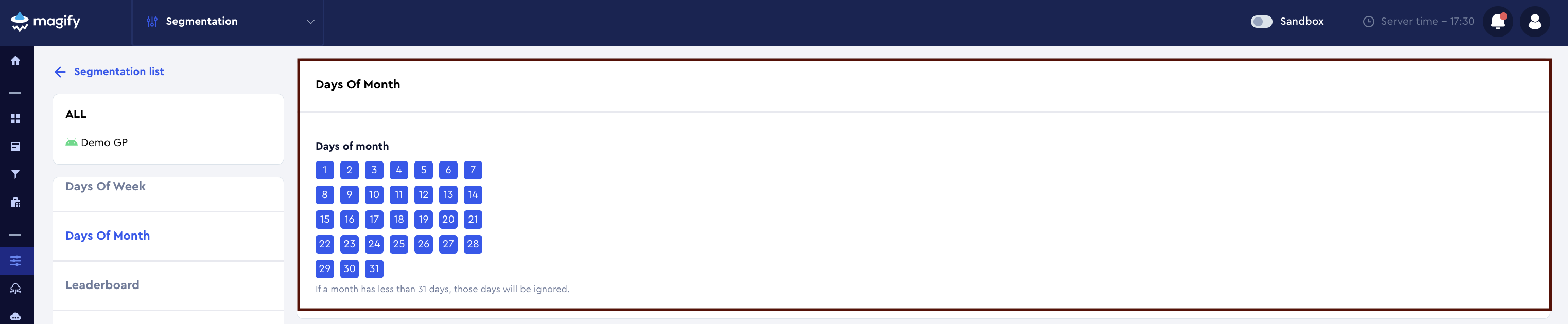
How Days of Month works
- you can select any set of days from 1 to 31;
- selected days are combined using OR logic;
- the segment is active when the user’s current day of the month matches one of the selected values.
How the day of the month is calculated
The day of the month is calculated on the server side.
- the server uses its own time as a baseline;
- if the client provides the user’s timezone, the server applies the client timezone to determine the user’s local day of the month;
- if the timezone is not provided by the client (SDK versions below 4.5.4), UTC is used.
As a result:
- if a user opens the app at 00:00 in their local timezone on the 15th, a segment configured for day 15 will be applied;
- changing the device time does not affect segment matching.
Months with fewer days
If a month has fewer than 31 days, days that do not exist in that month are ignored.
Examples:
- if 31 is selected, the segment will not be active in months with 30 days or in February;
- if 29is selected, the segment will be active:
- in months with 29 or more days;
- only in leap-year February.
Default behavior
When a new segment is created, all days of the month (1–31) are selected by default.
If the days are not modified, the segment is not restricted by this criterion.
Recommendations
- use Days of Monthfor:
- monthly events;
- bonus and payment cycles;
- date-specific feature activation;
- always consider the length of the current month when configuring segments.
IDFA
The IDFA criterion allows you to segment users based on the availability of the advertising identifier (IDFA) (Identifier for Advertisers) on the user’s device.
IDFA is commonly used by attribution and analytics systems to:
- link installs to ad campaigns;
- analyze advertising performance;
- support user attribution.
Is IDFA available
The Is IDFA available field defines whether IDFA is available for a user.

Three values are available:
Unknown
Default state.
Means that:
- the segment is not restricted by IDFA availability;
- all users are included, regardless of whether IDFA is available or not.
Recommended when:
- IDFA is not relevant for the segment logic;
- no IDFA-based filtering is required.
Yes
IDFA is available.
The segment will include users who:
- have granted permission to share IDFA;
- have an accessible advertising identifier on their device.
Commonly used for:
- UA and advertising scenarios;
- segments requiring full attribution data.
No
IDFA is not available.
The segment will include users who:
- did not grant permission to share IDFA;
- have IDFA disabled or unavailable.
Used for:
- non-IDFA audiences;
- analysis of users without advertising attribution;
- privacy-focused scenarios.
Default behavior
When a new segment is created, Unknown is selected by default.
If the field is not modified, the segment does not filter users by IDFA.
Recommendations
- use Yes / No only when IDFA availability is critical for the segment;
- for most product and UI scenarios, Unknown is sufficient;
- for UA and analytics use cases, explicitly set Yes or No.
You can view an example of an IDFA-based segment for the Demo application by following this link.
Generated In-App Purchases
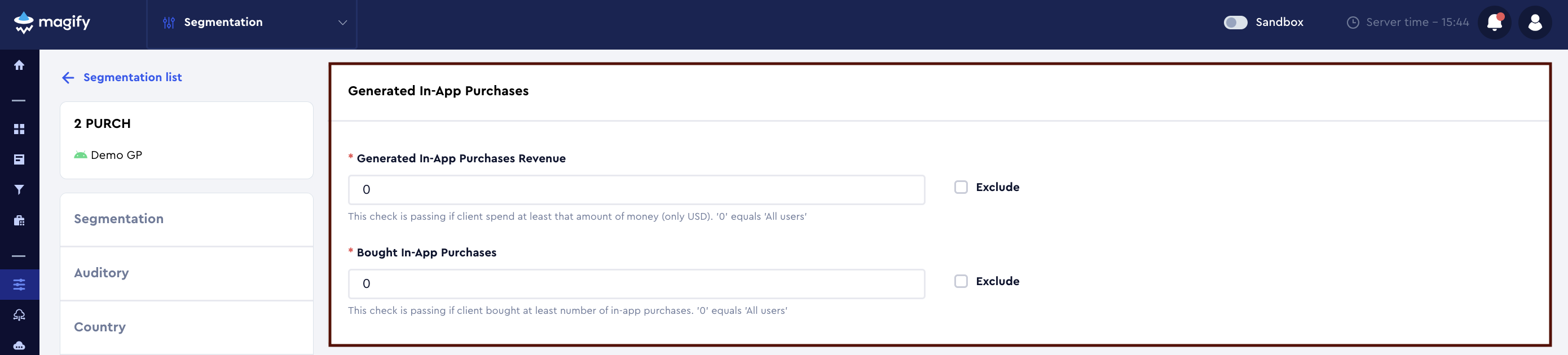
The Generated In-App Purchases block allows you to segment users based on their in-app purchase activity.
All amounts are specified in USD.
Generated In-App Purchases Revenue
The Generated In-App Purchases Revenue field defines the minimum revenue generated by a user from in-app purchases.
- the value is specified in USD;
- the condition is checked as “spent at least this amount”;
- the value 0 means all users, regardless of spending.
Exclude
If Exclude is enabled, the condition is inverted:
- the segment will include users who spent less than the specified amount.
Bought In-App Purchases
The Bought In-App Purchases field defines the minimum number of in-app purchases made by a user.
- the condition is checked as “made at least N purchases”;
- the value 0 means all users, regardless of purchase count.
Exclude
If Exclude is enabled, the condition is inverted:
- the segment will include users who made fewer purchases than specified.
Block logic
- both fields work independently;
- if both are set, conditions are combined using AND logic;
- the Exclude flag applies per field, not globally.
Recommendations
- use this block to:
- separate paying and non-paying users;
- identify low and mid spenders;
- build payment-based product logic;
- for advanced scenarios (ranges, time windows, specific products), use Payment Activity or Product blocks.
You can view an example of a Generated In-App Purchases–based segment for the Demo application by following this link.
Payment Activity
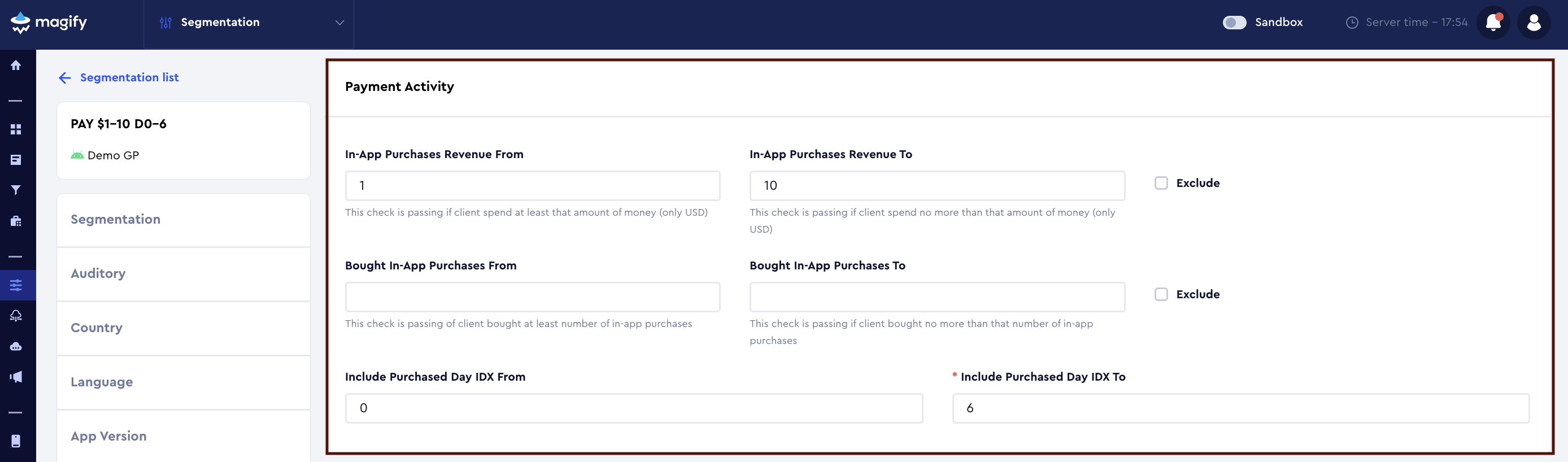
The Payment Activity block allows you to segment users based on their payment activity within a specific time window.
All amounts are specified in USD.
All conditions inside this block are combined using AND logic.
In-App Purchases Revenue From / To
The From and To fields define a revenue range generated by the user from in-app purchases.
- From — minimum amount (≥);
- To — maximum amount (≤).
Exclude
If Exclude is enabled, the specified range is excluded.
Bought In-App Purchases From / To
Defines a range for the number of in-app purchases made by the user.
- From — minimum number (≥);
- To — maximum number (≤).
Exclude
If Exclude is enabled, the specified range is excluded.
Include Purchased Day IDX From / To
Defines the time window (in days) during which purchases are counted.
0— today;1— yesterday;- up to
180days.
Both fields are required when using Payment Activity.
You can view this segment example in the Demo application using this link.
Rewarded Video Impressions
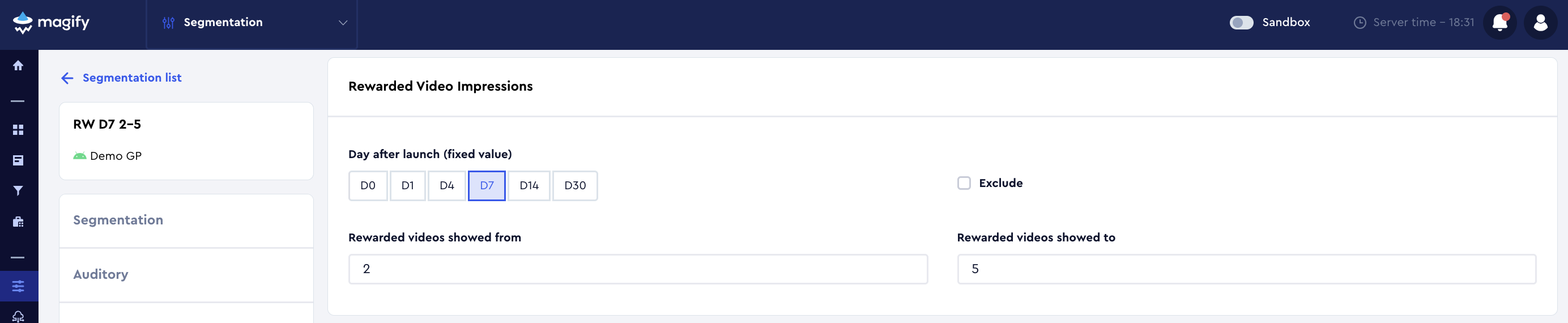
The Rewarded Video Impressions block allows you to segment users based on the number of rewarded videos they have watched at a fixed day in the user’s app lifetime.
Day after launch (fixed value)
The Day after launch (fixed value) field defines a fixed point on the user’s lifetime timeline at which rewarded video impressions are evaluated.
Available values:
- D0 — install day (first app launch);
- D1 — 1 day after install;
- D4
- D7
- D14
- D30
Selecting D7 means:
the system checks how many rewarded videos the user had watched by their 7th day in the app, regardless of when this happened (even if it was months ago).
Rewarded videos showed from / to
The Rewarded videos showed from and Rewarded videos showed to fields define a range of rewarded video impressions accumulated by the user by the selected lifetime day.
- from — minimum number of impressions (≥);
- to — maximum number of impressions (≤).
Exclude
If the Exclude flag is enabled, the specified range is excluded from the segment.
Key logic (important)
The Rewarded Video Impressions block does not restrict users by their current lifetime day.
This means:
- a user may have been using the app for months or even years;
- if the user met the rewarded video condition by the selected day (for example, D7), the user will still match the segment.
Timeline example
Assume D7 is selected.
User timeline:
- D0 — watched 1 rewarded video
- D5 — watched 1 more rewarded video
- D10 — watched 1 more rewarded video
Result:
- at D7, the user has 2 rewarded video impressions;
- at D14, the user has 3 rewarded video impressions.
When to use this block
Use Rewarded Video Impressions when you need to:
- segment users based on early engagement behavior;
- identify users who actively watch rewarded ads;
- control rewarded ad pressure;
- configure monetization logic for non-paying users.
Recommendations
- always explicitly set Day after launch (fixed value);
- do not use this block as a replacement for Day after launch from / to;
- when targeting “fresh” users only, always combine this block with Day after launch criteria.
You can view an example of a Rewarded Video Impressions–based segment for the Demo application by following this link.
UA (User Acquisition)
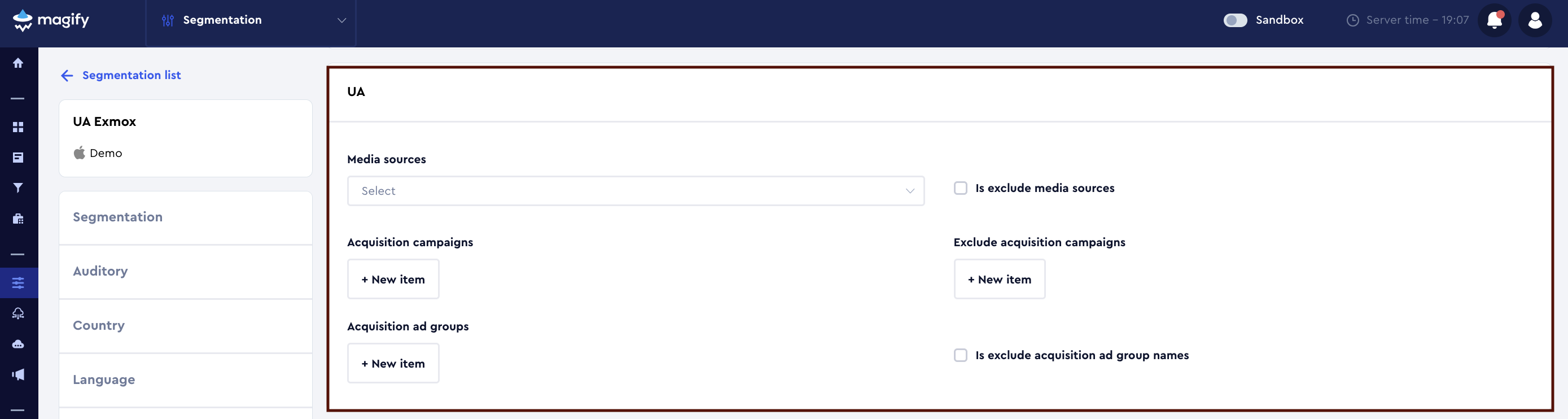
The UA block allows you to segment users based on user acquisition data received from the MMP (media source, campaign name, and ad group).
This block is used to:
- separate paid and organic traffic;
- apply different configurations for specific ad networks;
- work with specific campaigns or ad groups;
- roll out features and experiments for selected traffic sources.
Media sources
The Media sources field allows you to select one or more media sources from which users were acquired.
Examples of media sources:
- Facebook Ads
- Google Ads
- TikTok Ads
- UnityAds
- IronSource
- Organic
Is exclude media sources
If Is exclude media sources is enabled, users acquired from the selected media sources will be excluded from the segment.
Acquisition campaigns
The Acquisition campaigns field is used to specify campaign names received from the MMP.
- Each campaign name is added as a separate item via + New item;
- Campaign names are matched exactly;
- Multiple campaigns are combined using logical OR.
Exclude acquisition campaigns
If Exclude acquisition campaigns is enabled, users from the specified campaigns will be excluded from the segment.
Acquisition ad groups
The Acquisition ad groups field allows you to segment users by ad group names reported by the MMP.
- Each value is added via + New item;
- Multiple ad groups are combined using logical OR.
Is exclude acquisition ad group names
When enabled, users belonging to the specified ad groups will be excluded from the segment.
Logical behavior
Within the UA block:
- values inside the same field are combined using OR;
- different fields are combined using AND.
Example:
- Media source = Facebook Ads
- Campaign = Launch_US
> users acquired via Facebook Ads AND campaign “Launch_US”.
UA segmentation is commonly combined with
UA segmentation is most commonly combined with:
- Country / Language — to split traffic by region and locale;
- App Version — to control rollouts and version-specific behavior;
- Launch Date — to target specific user cohorts.
You can view an example of a UA-based segment for the Demo application by following this link.